
Don’t Miss the ship.
All Aboard is a free cruise companion that tracks ship time, sets a loud, full-screen all-aboard alarm, and keeps your port itinerary one tap away. All Aboard is on your phone, your watch, and your home screen.


Smart packing, polished sail mornings.
A bundled packing list with built-in nags, a prohibited-items reference with line-specific policy links, ship-info shortcuts, and a friendly morning-of reminder so nothing gets left behind.
Packing List
60+ bundled items grouped by carry-on and checked bag, organized by category. Tap to check off, swipe to delete what you don’t need, and add your own. Each cruise keeps its own progress.
What Not to Pack
Quick reference of 32 commonly-prohibited items across 7 categories. When your cruise line publishes a policy URL, one tap opens their official page.
Ship info shortcut
Tap the small ship icon on any cruise row to jump straight to the cruise line’s ship-info page — deck plans, dining, amenities, all in one tap.
Sail-day packing nudge
On the morning of sail, the widget, lock screen, and an 8 AM notification tell you exactly how many items are still unpacked. Tap Dismiss in the packing list to silence it once you’re confident.
Lock-screen widget (iOS)
Add All Aboard to your iPhone lock screen for an at-a-glance countdown. Also shows in StandBy mode (phone in landscape on a charger) and on the Always-On Display (iPhone 14 Pro and later).
Switch between cruises
Booked more than one trip? Flip between them at the top of the Essentials hub — your packing list and prohibited-items policy follow your selection.
Everything a cruiser actually uses.
No bloat, no account sign-in, no upsell paywall blocking the useful stuff. The app is free; an optional in-app purchase removes banner ads.
Ship Time + Local Time
Set the timezone offset. No more squinting at the daily Cruise Compass to figure out whether “4:30 PM” means your phone or the ship.
Loud, full-screen alarm
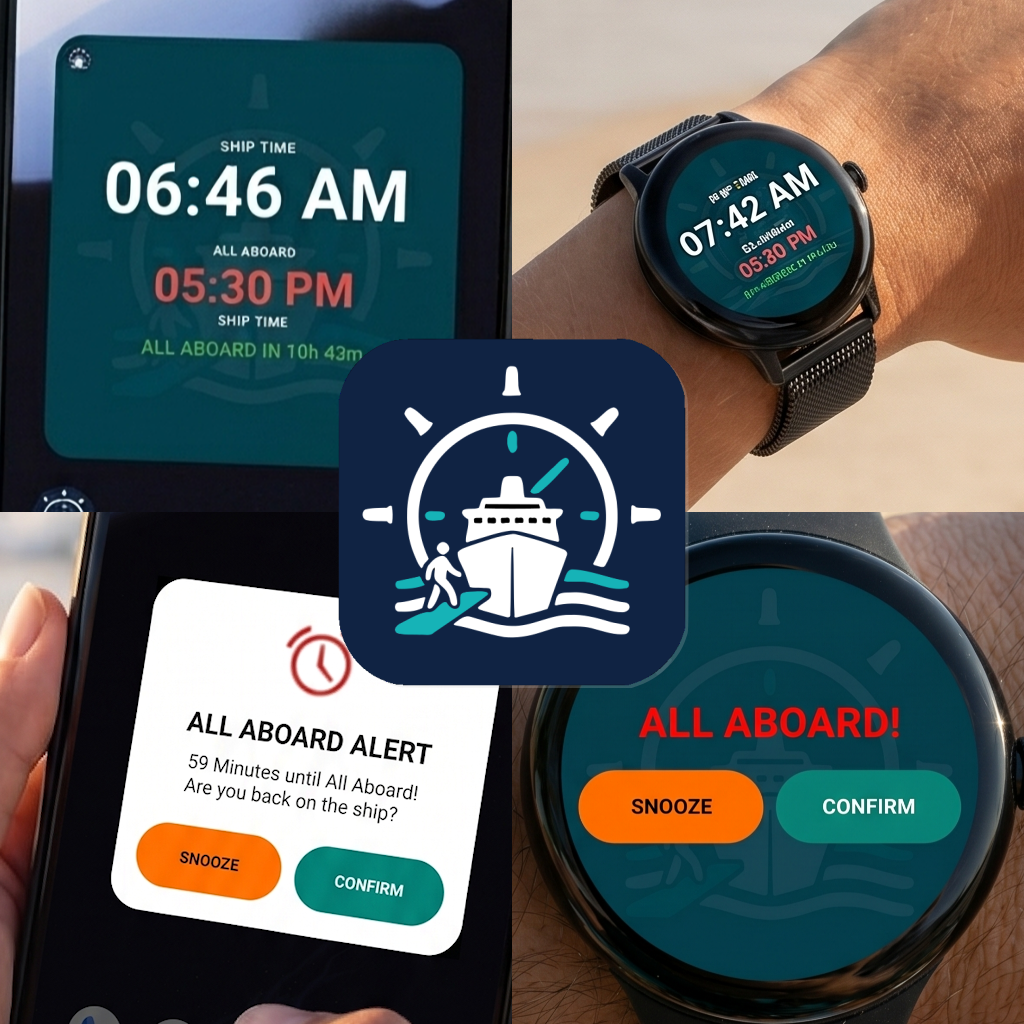
Pick a boat bell or boat horn, set the all-aboard time, and the alarm fires full-screen with vibration — even on Do Not Disturb. Snooze, dismiss, or share the time with your travel group.
Port by port
Track embark, every port day, sea days, and disembark — with arrival/departure times in ship time. Add a muster station, payment due date, and notes.
Watch companion
A watch tile with a watch-side alarm that fires even when your phone is out of reach. Set it once on the phone and the watch stays synced.
Home-screen widget
A live countdown widget right on your phone’s home screen — ship time, all-aboard time, and the countdown all visible at a glance. No need to open the app.
Multi-cruise library
Plan the next one while you’re still on the current one. Archive past trips so they’re out of the way but still searchable when you want to relive a memory.
Import via QR code
Scan the QR Code shared from your crusie partners device or use the Advanced Cruise Planner spreadsheet — paste your trip, scan the QR, and the entire itinerary lands in the app in seconds.
Backup & share
Back up every cruise to a single file, share a cruise with a travel partner, or restore from a backup on a new phone. Your data, yours to move.
Translated for travelers
Available in 20 languages: English, Arabic, Chinese (Simplified, Traditional, Hong Kong), Danish, Dutch, Finnish, French, German, Greek, Hindi, Italian, Japanese, Korean, Norwegian, Portuguese, Russian, Spanish, and Turkish.
How it works.
Three taps from installed-to-alarm-set. The boring stuff (timezone math, alarm permissions, exact-alarm scheduling) is handled for you.
Set ship time
Open the app on embarkation day and tap the offset arrows until the ship-time clock matches the captain’s announcement. That’s it.
Pick your all-aboard
Open the daily Cruise Compass, see when all-aboard is, and tap LET’S GO. The app schedules an exact alarm, even on battery-optimized phones.
Enjoy the port
Phone in pocket, watch on wrist, widget on home screen — whatever you glance at shows the countdown. When it’s time to head back, the alarm finds you.
Built for the wrist, too.
The watch companion app (tile) isn’t a thin port, it’s one of the most useful parts of All Aboard for anyone who may not always have their pholne on them while they explore.
- Live countdown Tile that updates every minute
- Vibrating watch-side alarm that fires independently of the phone
- Auto-syncs from the phone — no separate setup

Quick questions.
If you have one not answered here, the in-app User Guide covers it in more detail — or email steve.meier@themeierco.com.
Is it really free?
Yes. The full feature set is free with a small banner ad. The optional Remove Ads purchase is a one-time in-app payment — no subscription. You don’t need to remove ads to use any feature.
Which cruise lines does it work with?
All of them. The app doesn’t connect to any cruise line’s system — you set the all-aboard time yourself from the daily program. That means it works on Royal Caribbean, Carnival, Norwegian, MSC, Celebrity, Princess, Disney, river cruises, expedition cruises — anything.
Does it need an internet connection?
No. Once installed, the app works fully offline. Useful because cellular plans on a cruise ship are unreliable and expensive.
Will the alarm wake my whole cabin?
You pick the volume and tone (boat bell or boat horn). It fires full-screen with vibration and bypasses Do Not Disturb so you don’t miss it — but you can also test it ahead of time and tune it down.
Do I need a watch?
Not at all. The phone app is the whole experience. The Wear OS app is a bonus if you have a watch — it installs automatically when you install the phone app on a paired Android phone.
What’s the Advanced Cruise Planner?
An optional Google Sheets / Excel workbook sold separately on Etsy: Advanced (but still simple to use) Cruise Planner. It has tabs for itinerary, packing, budget, and an AAImporter sheet that turns your trip into a QR code you scan into the app. Totally optional — you can enter cruises by hand in the app.
Do you collect my data?
No personal data. The app uses Google AdMob for the banner ad (standard mobile-ad data — see the in-app privacy policy) and Google Play Billing for the Remove Ads purchase. Your cruise data lives on your phone only.
Ready to sail?
Install All Aboard before your trip — set it up at the dock with the captain’s first ship-time announcement and you’re done.