
Someone shared an alarm schedule with you.
Get Alarmore (free), then scan the code or tap the link again. The schedule opens in the app, ready to check and save.


Alarmore
Alarms that follow your real schedule.
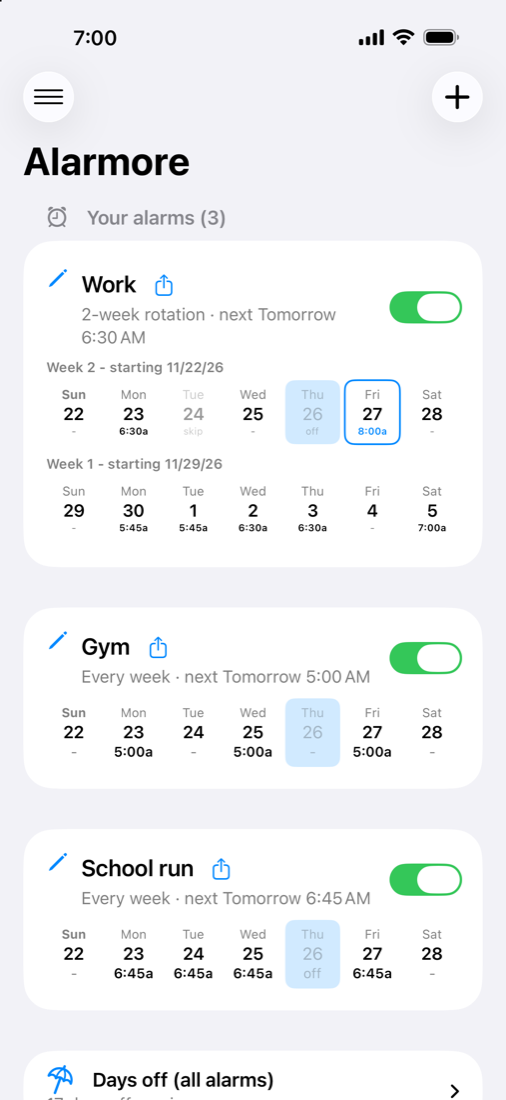
Your weeks aren’t all the same, so why is your alarm? Alarmore is an alarm clock for iPhone and Android with a different time for each day, every-other-week rotations, shift cycles, days off and holidays. Set it up once and stop turning alarms on and off by hand.
Set it up once.
No account and no sign-up. Tell Alarmore how your weeks really go, and it rings on the days you work and stays quiet on the days you don’t.
Build your schedule
A different wake-up time for each day of the week, a 2, 3 or 4-week rotation, or a shift cycle like 4 on, 4 off. Pick a ready-made pattern or make your own.
Mark your days off
Tap a vacation day or a whole week, and let your country’s public holidays turn your alarms off too. Every repeating alarm follows along.
Adjust as life happens
Skip tomorrow with one tap, change just one day’s time, or add an alarm on a day you’re normally off. The rest of your schedule stays the same.
Everything your week needs.
Made for real life: work and school weeks that change, early days and late starts, every-other-week schedules, part-time jobs and shift work. On iPhone, iPad and Android.
A different time each day
Monday at 5:45, Wednesday at 6:30, Saturday at 7:00. Plus one-time alarms for a flight, an appointment or an early start.
Rotations and 9/80 PRO
2, 3 or 4-week rotations, like every other Friday off, and a one-tap 9/80 schedule.
Shift cycles PRO
Counted in days, no matter the weekday: 2 on 2 off, 3 on 3 off, 4 on 4 off, Pitman 2-2-3, DuPont, 24 on 48 off, day and night patterns, or your own cycle up to 42 days.
Skip a day
One tap skips a single ring and the rest of the schedule stays on. Free up to 3 days ahead, further with Pro.
This day only
Change one date’s time (8:00 instead of 6:00 this Sunday), or add an alarm on a day you’re normally off. Handy for shift swaps.
Days off and vacations PRO
One Days off calendar silences every repeating alarm, single days or whole weeks, up to a year ahead. Keep one alarm ringing anyway if you need it.
Holidays for 240+ countries
Public holidays shown on your calendars for free. With Pro, they can turn your alarms off too, with a switch for each holiday.
Nap timer
15, 20, 30, 45 minutes, 1 hour, 1 hour 30, or any length you choose, from the app or the widget. It cleans itself up after it rings.
A widget that helps
Your next alarms at a glance. Tap one to skip it, with a confirmation so you never skip by accident, or tap + for a new alarm or a nap.
Alarm check
Finds the phone settings that can stop an alarm, takes you to each one, and rings a test alarm in 1 minute so you can see it work.
Real alarms on iPhone
On iOS 26 and later, Alarmore sets real system alarms that ring even in Silent mode. On Android, a paired Wear OS watch buzzes too.
Quick messages PRO
“Running late” or “Not feeling well” in one tap, through your own Messages app. “Not feeling well” can also turn off the rest of today’s alarms.
Share a schedule
Send an alarm as a QR code, link or file. Family, classmates or coworkers scan it and get the same alarm, on iPhone or Android.
Backups
Back up and restore any time, and move to a new phone with one file. With Pro, automatic backups to your phone, iCloud Drive (iPhone) or your own Google Drive.
Your calendar
Export your alarm days to a calendar file for free, or with Pro keep them in the calendar you choose, updated automatically.
Free, with a one-time Pro unlock.
No subscription and no ads. Try every Pro feature free for 30 days. The trial never charges you, and your alarms keep ringing after it ends.
Free
Free forever
- Weekly alarms with a different time each day
- One-time alarms and naps
- Skip or change a day, up to 3 days ahead
- Home-screen widget
- Public holidays on your calendar
- Alarm check and test alarm
- Sharing and backups
Alarmore Pro
One-time purchase
- 2, 3 and 4-week rotations, and 9/80
- Shift cycles counted in days
- Days off and vacations
- Holidays that turn your alarms off
- Skip or change any day further ahead
- Quick messages
- Automatic backups and calendar sync
Your alarms stay on your phone.
Alarmore was built with no account and no server of ours. Your alarms, days off and messages stay on your phone, and sharing goes straight from one phone to another.
- No account to create
- No ads and no tracking
- Backups go only where you choose
- Shared schedules never pass through our servers
Read the details in the Alarmore section of our Privacy Policy.
How Alarmore uses Google Drive.
Alarmore is an alarm clock. Its only use of a Google account is an optional backup: with Alarmore Pro you can choose to save automatic backups of your alarms to your own Google Drive.
Only its own files
Alarmore asks Google for the narrowest Drive permission. It creates a folder called Alarmore and can see and change only the backup files it saves there, never anything else in your Drive.
Never sent to us
Backups go straight from your phone to your Drive. We never receive them, and your Google data is not used for ads, analytics or AI training.
Optional and reversible
Alarmore works fully without a Google account. Switch backups to your phone or iCloud Drive at any time, and remove Alarmore’s access in your Google Account. Details in our Privacy Policy.
Alarm questions.
Don’t see yours? Email support@themeierco.com and we’ll help.
Will it ring when my phone is on silent?
On iPhone with iOS 26 or later, yes: Alarmore sets real system alarms that ring even in Silent mode. On earlier iOS versions, alarms ring as Time Sensitive notifications, so keep your ringer switch on. On Android, alarms use the alarm volume, like your phone’s own clock. Alarm check in Settings shows anything that could stop an alarm and takes you to the right setting.
Is Pro a subscription?
No. Alarmore Pro is a one-time purchase. You can try every Pro feature free for 30 days first, and the trial never charges you.
What happens when the free trial ends?
Every alarm you set keeps ringing, and everything free keeps working. Pro features can’t be added or changed until you unlock Pro, and you can still skip a day up to 3 days ahead.
Which shift patterns does it handle?
Ready-made 2 on 2 off, 3 on 3 off, 4 on 4 off, Pitman 2-2-3, 2 days 2 nights 4 off, 4 days 4 off 4 nights 4 off, 24 on 48 off, 48 on 96 off and DuPont, or a custom cycle from 2 to 42 days. Day and night shifts can have different times, and any single day can have its own.
Which country’s holidays does it use?
You pick the country in Settings › Holidays. Alarmore has public holidays for more than 240 countries and regions. Regional or state holidays aren’t included, and you can turn any single holiday back on if you work that day.
How do I move to a new phone?
Use Backup › Share full backup to send one file to the new phone (AirDrop, Messages, email or Quick Share), then open it there with Alarmore and choose to restore. Backups work between iPhone and Android in both directions.
Someone sent me a QR code. What do I do?
Scan it with your phone’s camera or with Alarmore (+ › Scan a shared schedule). If you don’t have Alarmore yet, the code brings you to this page and to the right store. After you install it, scan the code again and the schedule opens, ready to check and save.
Which devices and languages?
iPhone and iPad with iOS 16 or newer, and Android phones with Android 7.0 or newer. Alarmore is available in 22 languages.
Support.
Questions, problems or ideas: we read every message. A real person at The Meier Co will write back.
What to include
These details help us find the answer faster:
- Your device (for example iPhone 16 or Pixel 9)
- Your iOS or Android version
- The Alarmore version (menu › About)
- What you tapped and what happened
- A screenshot, or the result of Alarm check
Wake up on the days that matter.
Rotations, shifts, days off and holidays, handled. For iPhone, iPad and Android.