
Stop guessing if you’ll make it to payday.
Breadline is a budget planner and bill tracker for iPhone and Android. It shows your balance day by day into the future, so you know what’s safe to spend today and whether you’ll be okay until the next paycheck.

Set up in about a minute.
No bank login and no account to create. Tell Breadline a few numbers you already know, and it lays out the days ahead.
Enter what you know
Your balance at the bank, your paycheck, your main bills, your rent or mortgage and your car loan. Estimates are fine. You can fine-tune them anytime.
See the next 60 days
Breadline draws your balance forward, day by day, and tells you right away if you’re good until payday or where it gets tight. Loan cards show your payoff date.
Check in each day
Mark bills as cleared when they hit your bank, drag a payment to a better day, and glance at Safe to spend before you buy something.
A bill calendar for your money.
Most budgets look back at what you already spent. Breadline looks ahead, so you can see a short week coming and fix it before it happens. On iPhone, iPad and Android, with the same features on each.
Your real balance
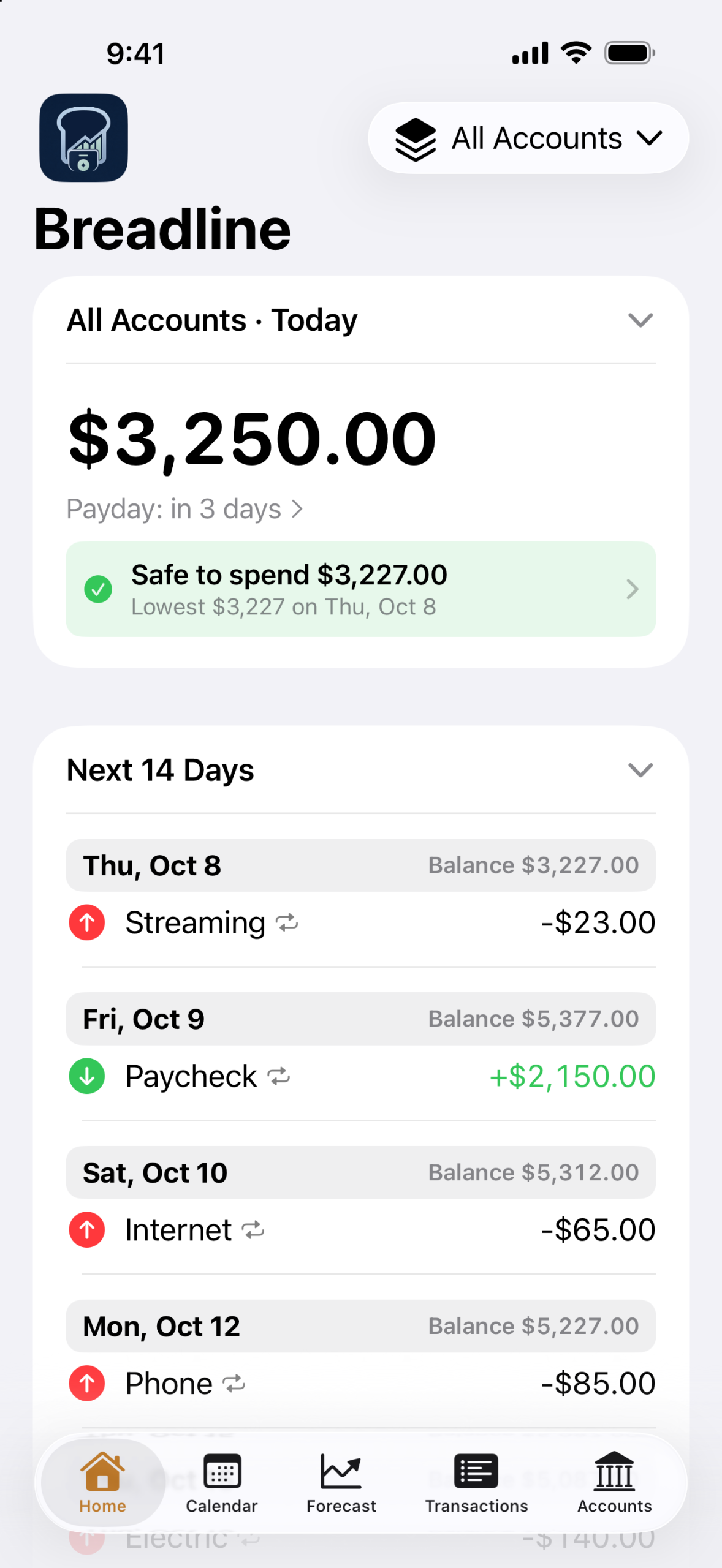
The main number matches your bank: cleared items only. Underneath, see what’s due but not cleared yet, and what you’ll have after those clear.
Safe to spend
The most you can spend today without dipping below zero later, counting every bill and paycheck already on the calendar.
Next 14 Days
Starting today, every bill and paycheck coming up, with your balance after each one.
Week view
Drag and drop a payment to another day. Tap to mark it due, scheduled or cleared, and watch the running balance update. A month calendar is one tap away.
Forecast
Chart your balance from 3 months up to 5 years out. See your lowest point and the first day you’d go below zero, then tap to jump to that day.
Can I afford it?
Type an amount and get a straight answer. If it’s a no, Breadline tells you which bill would come up short and the day it would be safe.
Repeating bills and paychecks
Weekly, every 2 weeks, twice a month, monthly and more, with a weekend rule that moves a date to Friday or Monday when you need it to.
Categories and monthly limits
Set a limit for groceries, gas or eating out, track it on Home, and let the forecast count what you haven’t spent yet.
Savings goals
Pick a target and a date. Breadline tells you how much to set aside from each paycheck to get there.
Loans and payoff dates
Mortgage, auto, student, personal and HELOC. See your payoff date, what paying extra would save, and handle escrow on a mortgage.
What-if scenarios
Try a raise, a new car payment or one less bill, and compare it side by side with your plan before you change anything.
Bank statement import
Bring in your bank’s CSV file. Breadline matches it to your bills, marks them cleared and adds anything new. The file is read on your phone.
Reminders and alerts
Get a reminder before a bill is due, and a heads-up a few days before your balance would drop below the line you set.
Home screen widgets
See Safe to spend, your next payday and your next bill without opening the app.
Automatic daily backups
Saved to your device, or to a folder you pick: iCloud Drive, Google Drive or any other folder. Restore anytime.
Made for everyone
English and Spanish, any currency, text size options, and full support for VoiceOver and TalkBack.
Your budget stays on your phone.
Breadline was built so your financial life never leaves your device unless you choose to save a backup somewhere. There is nothing to sign up for and nothing to link.
- No bank login, ever
- No account to create
- No internet connection used
- No ads and no analytics
- Backups go only where you choose
- Bank statement files are read on your phone
Read the details in the Breadline section of our Privacy Policy.
Budget app questions.
Don’t see yours? Email support@themeierco.com and we’ll help.
Does it connect to my bank?
No. Breadline never asks for your bank login and never connects to your bank. You enter your balance and your bills yourself, which takes about a minute. To catch up faster, download a statement from your bank as a CSV file and use Accounts → Import Bank Statement. Breadline reads the file on your phone and matches it to your bills.
Where is my data stored? What about backups?
Everything stays in the app’s private storage on your phone. Breadline doesn’t use the internet, and we never receive your data. Automatic daily backups are saved to your device, or to a folder you pick, like iCloud Drive or Google Drive. Find them in Accounts → Backups, where you can also back up now or restore. A restore always saves your current data first, so you can undo it.
Can I use another currency?
Yes. Breadline uses your phone’s currency automatically, and you can pick any other currency in Accounts → Currency. Changing it changes how amounts are written; it doesn’t convert them.
Is it in Spanish?
Yes. Breadline is fully available in English and Spanish and follows your phone’s language. On iPhone and iPad you can also set the language just for Breadline in the Settings app, under Apps → Breadline → Language.
How do I move to a new phone?
Restore from a backup. On iPhone, if your backups go to iCloud Drive, install Breadline on the new phone with the same Apple Account, open Accounts → Backups and tap the latest backup to restore it. On Android, or for any other folder, save a backup file to Google Drive or another place you can reach from the new phone, then use Restore from a Backup File on the new phone. The same backup file works between iPhone and Android, so you can switch either way.
How do I delete my data?
Go to Accounts → Erase All Data, or simply uninstall the app. Since nothing is stored on our side, there is nothing else for us to delete. Backups you saved to iCloud Drive, Google Drive or another folder stay there until you delete them yourself.
Which devices does it work on?
iPhone and iPad running iOS or iPadOS 26 or newer, and Android phones running Android 10 or newer. Both versions have the same features.
What does “Safe to spend” mean?
It’s the most you could spend today and still never go below zero later, counting the bills and paychecks you’ve scheduled. If a big bill is coming before your next paycheck, Safe to spend already accounts for it.
What’s the difference between due, scheduled and cleared?
Due means the date has arrived and you haven’t marked it yet. Scheduled means the payment is set up but hasn’t hit your bank. Cleared means it’s on your bank statement. Your main balance counts cleared items only, so it should match your bank.
Support.
Questions, problems or ideas: we read every message. A real person at The Meier Co will write back.
What to include
These details help us find the answer faster:
- Your device (for example iPhone 16, iPad, Pixel 8)
- Your iOS or Android version
- The Breadline version (shown in your phone’s app settings or the app store)
- What you tapped and what happened
- A screenshot, if you can
Please don’t send account numbers or bank logins. We never need them.
Know you’ll make it to payday.
See the days ahead, spend with confidence, and keep your budget on your phone. For iPhone, iPad and Android.