

A phone they can actually use.
Senior Assistant turns any Android phone into a simple, safe device for someone navigating memory changes — and gives the caregiver peace of mind that the basics still work.

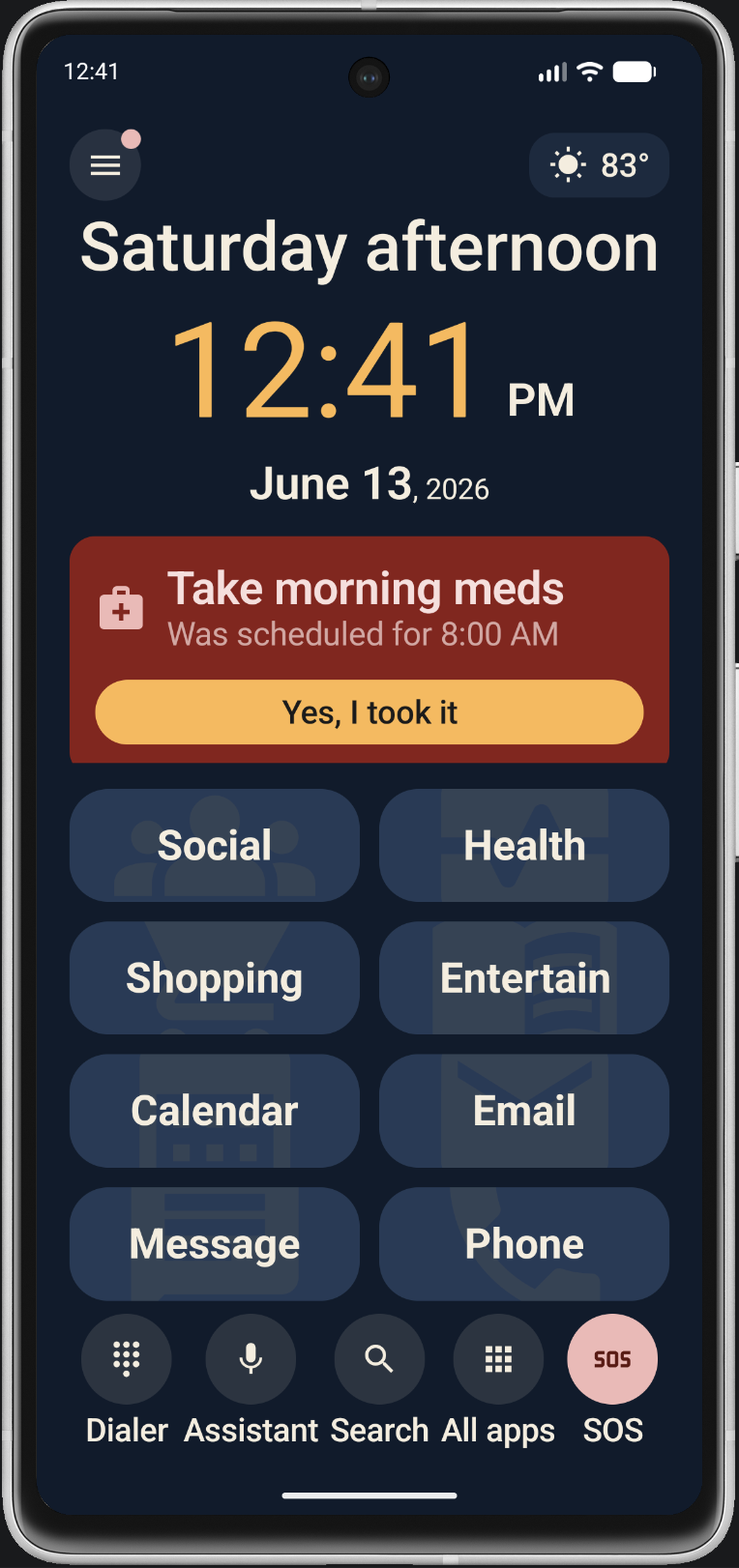
Designed for memory changes. Built for the caregiver.
Senior Assistant replaces Android’s busy home screen with eight big labeled tiles — Phone, Message, Email, Calendar, plus four folders you fill with the apps your loved one actually uses. The caregiver picks; the senior just taps.
Eight big tiles
A 2-column grid of large labeled tiles — no swipe pages, no widgets that move, no Google search bar. Everything they need is one tap away.
Big-face favorites
A short list of important people with large photos and names. Tap a face to call or text — no scrolling through hundreds of old contacts.
Custom dialer
Big-button incoming, outgoing, and in-call screens — Speaker, Mute, Hang up. No clutter, no easy mis-taps mid-call.
SOS button
One red button always visible. Calls the emergency contact you set — a spouse, an adult child, whoever should answer first.
Reminders & medications
Recurring meds, doctor appointments, and daily check-ins. Pre-loaded morning, afternoon, and evening medication slots are ready to fill in.
Location sharing
Set up Google Family Group once and see where they are on a live map — no extra tracker to buy, no extra app to manage.
Notification filter
Block the noise — game alerts, marketing pings, spam — and allow only the apps that matter. Less chaos on the lock screen.
Scam protection
Private DNS blocks fake-virus pop-ups before any browser can show them. Paired with a safer default browser, the open web gets much less risky.
Three steps to a phone that just works.
Set it up in caregiver mode, then hand it over. Everything that could break, get changed by accident, or open the wrong app is locked behind a PIN only you know.
Install & set as Home
Download from Google Play and follow the guided wizard. Senior Assistant becomes the device’s home screen and (optionally) its phone app.
Configure in caregiver mode
Pick the tiles, add favorite people with photos, set the emergency SOS contact, and set the calendar source. A 4-digit PIN locks everything down.
Hand them the phone
They use it like a normal phone — only it’s simpler. The System Status panel tells you at a glance if anything drifts out of place later.
Peace of mind, designed in.
The senior gets a simpler phone. You get a quieter mind. Senior Assistant is built around the moments that matter for a caregiver.
- See their live location on Google Maps
- One-tap SOS dials the contact you set
- System Status panel catches setup drift
- Custom lock screen shows the next reminder
- Robo-calls and unknown senders auto-blocked
- Caregiver PIN gates anything that could break

One plan unlocks everything.
All three options unlock the same app — every feature, every future update. Pick the cadence that fits your family. Both subscription plans start with a free 14-day trial.
Monthly
14-day free trial
- Cancel any time
- All features unlocked
- All future updates
Annual
14-day free trial · ~$2.92 / month
- Save 27% vs monthly
- All features unlocked
- All future updates
Lifetime
No renewals, ever
- Pay once, done
- All features unlocked
- All future updates
Billing runs through Google Play — your account, your payment method, your cancel-anytime rights. No separate signup, no credit card field inside the app. Full pricing details & cancellation help →
Common questions.
Got one not answered here? Email sdmeier@gmail.com, or read the full Help & Guides.
What phone does it work on?
Any Android phone running Android 8 (Oreo) or newer. There is no iPhone version — Senior Assistant is a home-screen launcher, and iOS does not allow third-party apps to replace the home screen. If your loved one has an iPhone, this app is not for them.
Is it safe? Can the senior break things?
Yes, it’s safe. A 4-digit caregiver PIN locks down Settings, Favorites, App Folders, tile rearranging, and the system clock app. The senior sees only the home screen and the apps you put on it — they can’t accidentally undo your setup.
What if I forget the caregiver PIN?
Use the master PIN with a small math challenge to confirm intent. It works on any device — see the Master PIN recovery article. The master PIN is a recovery mechanism for caregivers, not a security boundary; the senior’s actual device PIN, fingerprint, and Google account are the real protection.
Does it need a subscription?
The 14-day free trial unlocks everything so you can set up the phone and hand it over before deciding. After that, choose monthly ($3.99), annual ($34.99), or pay once for Lifetime ($89.99). No tier is “less app” — they all unlock the same features.
Do you collect their data?
No personal data leaves the device. Settings, favorites, folders, reminders, and the caregiver PIN all live on the phone. Calendar and contacts read from the device’s own accounts (Google, Outlook, etc.) — Senior Assistant doesn’t host or sync them.
Can I move it to a new phone?
Yes. Sign the new phone into the same Google account, install from Play, and the subscription/Lifetime is detected automatically. Favorites, folders, and reminders are device-local — you re-create them on the new phone (most caregivers find it goes faster the second time).
What if they call 911?
Emergency calls always go through, regardless of which app is the default phone. Senior Assistant never intercepts 911.
Make the phone simple again.
Senior Assistant gives an older adult a phone they can navigate — and gives you the controls to keep it that way. Try it free for 14 days.